
When you log into Kiip, your client directory will be your homepage.
View & Filter Client List
You can view a list of all of the clients who have worked with your program sorted by their date of ‘Last Activity.’ The default view will include clients specifically assigned to you.
You can click the ‘Add Filter’ button to expand an additional list of filters allowing you to organize your client list by City, State, Zipcode, Language and Gender. You can also filter your client list to see clients assigned to you or other team members.
Assign Clients
Choose ‘unassigned’ to see clients without a staff member in their room. You can then assign yourself or another team member to support that client.
View Individual Clients
To review individual clients from the directory page, click on the name of the client to review. A "Client Preview" will appear on the side of your screen, providing initial contact and demographic information, if available.
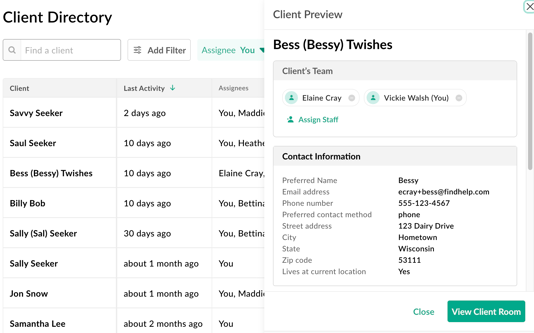
From the Client Preview screen, you will be able to access the Client Room for additional client and case navigation support.